Storm Team 12
- 4.6
- Rating
- 100.00K
- Installs
- Free
- Price

 Analysis by App-foxy
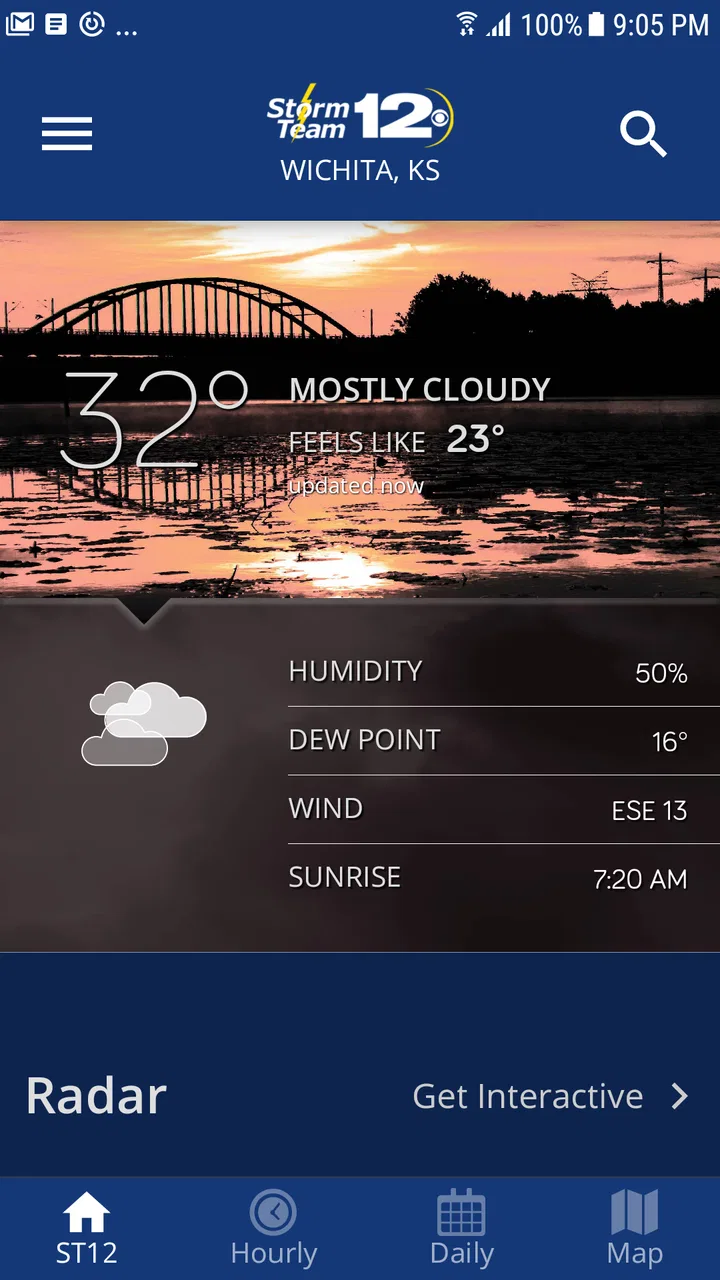
When I need a quick local weather check rather than a broad national forecast, Storm Team 12 feels like the kind of app I would keep close to the home screen. It is a free weather app from Gray Media, built around the Storm Team 12 service, and its main appeal is straightforward: it gives Android users a focused place to check conditions, follow changing weather, and decide what to do next.
I approached it as I would any practical weather tool: open it before leaving home, look for the information that affects the next few hours, and then see whether it helps with a more cautious decision about travel or outdoor plans. That workflow matters more than a colorful forecast screen. A weather app earns its place when it reduces uncertainty without making me dig through menus or interpret unnecessary detail.
Storm Team 12 has been available since August 25, 2011, and the current release is version 6.1.701. Its Everyone age rating makes it suitable for a household device, while its 4.6 average from around 6 thousand ratings suggests that many users find the overall experience dependable. I would still judge it by how well it fits my own routine, because a strong local app can be useful to one person and too limited for another.
You May Also Like

 Blood Strike: 2.5 Anniversary
Blood Strike’s Loadouts Turn Every Drop Into a Tactical Gamble
A close look at Blood Strike’s custom loadouts: how fast access to signature weapons reshapes its battle royale rhythm, rewards preparation, and narrows the gap between fights.

 Pandora - Music & Podcasts
Pandora’s Music Is Easy to Start, but Harder to Recover
Pandora’s strength is its low-effort path from a seed to a station. Its weak spot is how much confidence it asks you to place in connection, setup, and quiet recovery.

 8 Ball Pool
 Is Built on Rivalries, Rematches, and Routine
A close look at the rivalries, rematches, shared routines, and unanswered safety questions that turn a quick pool match into a persistent mobile community.

 Samsung Music
’s Quiet Strength Is Playing What You Already Own
Its reach comes less from spectacle than from dependable access to a personal library. That simplicity is both the app’s strongest retention engine and its ceiling.

 AccuWeather: Weather Radar
AccuWeather Review: A Quick, Clear Forecast for Everyday Decisions
For everyday plans, the best forecast is the one you can understand quickly. AccuWeather makes rain timing, radar, and local conditions easy to act on, with a few trade-offs.

 Hill Climb Racing
Why Hill Climb Racing Still Turns Crashes Into One More Run
A tiny car, a bumpy hill and one more upgrade: Hill Climb Racing keeps resurfacing because its simple chaos makes every near-miss feel personal.
More From Our News Desk
View All News


From opening the app to making a weather decision
I find the most useful way to judge a weather app is to follow the whole chain from opening it to changing a plan. Here, I’ll look at what makes Storm Team 12 a practical local checkpoint, where a household still needs its own judgment, and how to share the result without assuming everyone uses weather information in the same way. That leads naturally to the everyday routines where the app is most helpful.
The starting condition: what I need before I leave
My usual starting point is not curiosity about the entire week. It is a small practical question: should I leave now, wait, carry extra protection, or change the plan? For that purpose, a local weather app has an advantage over a general search result. It gives me a dedicated place to return to instead of making me repeat the same search and sort through unrelated pages.
Storm Team 12 is especially suited to people who want weather information connected to a particular local news operation. That focus can be more useful than a worldwide weather service when the important issue is what is happening around the community covered by the Storm Team 12 brand. I would open it before a commute, while preparing children for school, or when deciding whether an outdoor appointment still makes sense.
The first useful habit is to check the app before relying on memory from an earlier forecast. Weather changes, and an app is most valuable when it becomes part of the decision rather than a one-time novelty. I would also avoid treating a single glance as a guarantee. A forecast is guidance, so I look for consistency between the immediate conditions and the expected trend before making a time-sensitive choice.
A step-by-step flow for a normal morning
My workflow starts with the current conditions. I want to know whether the weather outside matches what I expected and whether the next part of the day appears stable or unsettled. This first check prevents a common mistake: dressing or planning based only on yesterday’s pattern. If the current picture already looks different, I know I should pay closer attention before leaving.
Next, I move from the immediate situation toward the forecast period that affects my plan. For a short trip, the next few hours matter more than a distant outlook. For a workday or school day, I compare the expected conditions around departure, arrival, and the return journey. This is a simple but important distinction: the most useful forecast is not always the longest one, but the one that overlaps with the decision I am making.
A practical tip is to check twice when the consequences of being wrong are high. I might look once while getting ready and again just before leaving. That second check is not wasted repetition if the weather is unsettled. It gives the app a chance to change my plan from “walk” to “drive,” or from “leave outdoor equipment out” to “bring it inside.”
I also use the app as a planning checkpoint rather than a replacement for judgment. If I am organizing a long outdoor activity, I would not rely on a single forecast screen and forget about it. I would return later, compare the updated outlook with the original plan, and decide whether the activity still has enough margin. The value is in the repeated workflow, not in pretending that one forecast can remove all uncertainty.
Where the handoffs happen
Weather information often passes through several people before it becomes a useful action. I may check the app first, then tell someone at home that the timing has changed, or send a message to a colleague about a delayed arrival. Storm Team 12 works well in that role because it gives me a shared reference point: instead of saying only that the weather “looks bad,” I can explain what I saw and why I am adjusting the plan.
That handoff is particularly helpful in a family routine. One person can check the forecast before breakfast, another can decide whether children need different clothing, and everyone can revisit the app before leaving. The app does not make the decision for the household, but it can reduce the back-and-forth caused by people looking at different sources.
There is also a handoff between the app and the wider Storm Team 12 service. A local weather app is most valuable when the user wants information connected to a regional weather operation rather than a generic forecast provider. I would choose it when local relevance is the priority, then use my own judgment for the final action. That division of responsibility keeps expectations realistic.
One non-obvious trade-off is that a focused local app may feel clearer than a broad weather platform precisely because it is not trying to serve every location and every type of user equally. The benefit is a more direct routine. The cost is that someone who travels frequently, compares many cities, or wants a highly technical weather dashboard may prefer a larger service with a wider toolset.
The outcome: turning a forecast into an action
Suppose I am leaving for work on a morning with uncertain conditions. I open Storm Team 12, check what is happening now, review the part of the forecast that overlaps with my commute, and decide whether the original timing still makes sense. If the outlook looks less comfortable than expected, I can leave earlier, choose a different route, or bring what I need instead of discovering the problem halfway through the trip.
The result is modest but useful: fewer avoidable surprises. A weather app does not control traffic, eliminate storms, or guarantee that every prediction will be right. What it can do is give me a repeatable way to pause before acting. That small pause is valuable when the alternative is making a decision based on an old forecast or a quick glance outside.
For outdoor plans, I would use a slightly longer version of the same process. I check the conditions before preparing, review the forecast again near the start time, and keep a backup option ready if the weather is changing. This is where Storm Team 12 is best understood: not as an automatic safety system, but as a convenient local checkpoint that supports better planning.
The app’s free price removes an obvious barrier for someone who wants to try it without committing to a subscription. Its popularity also gives it a reassuring degree of visibility, with over one hundred thousand installs. I would not treat that figure as proof that it is perfect, but it does make the app feel like an established option rather than an obscure experiment.
Where the workflow breaks down
The biggest limitation is the same quality that makes the app appealing: its local focus. If I need detailed comparisons between several destinations, a broad national service may be more convenient. Someone planning a road trip across multiple regions could spend more time switching locations than actually planning. In that situation, Storm Team 12 would be better as a local reference than as the only weather app.
I would also skip it as my sole tool if I need specialized information for demanding outdoor activities. Hikers, boaters, pilots, and people managing weather-sensitive work may require more technical data and more specialized presentation. A general local weather app can support those decisions, but it should not automatically replace the tools designed for them.
Another point of friction is the human tendency to overtrust a clean forecast. Even when an app presents information clearly, changing conditions can make a plan outdated. I would avoid opening it once in the morning and assuming that the same answer remains valid all day. The better approach is to revisit it when the decision is close, especially for travel or outdoor commitments.
Users who dislike local-news branding may also prefer a neutral weather service. Storm Team 12 is not trying to be an anonymous utility; its identity is part of the experience. I see that as a strength when I want a regional source, but it may feel less suitable to someone who wants only a minimalist temperature display with no connection to a local media team.
How it compares with the usual alternatives
Compared with checking weather through a browser, the app offers a more deliberate routine. I do not have to start with a search query or decide which result deserves attention. That convenience is small, but it matters when I am already late or carrying groceries. A browser remains useful when I am away from my normal location or researching several places, while Storm Team 12 is more natural for repeated local checks.
Compared with a built-in phone weather widget, the app gives me a dedicated destination rather than a glanceable shortcut. A widget is faster for a single number or a quick visual cue, but it can encourage me to stop at the first piece of information. I prefer Storm Team 12 when I want to make a proper check before committing to a plan, while the widget wins when speed is the only goal.
Compared with large international weather platforms, its strength is concentration. I would choose the local app when the weather around the Storm Team 12 coverage area is what matters most and I want a familiar regional source. I would choose a broader alternative when my day involves several cities, international travel, or advanced comparisons. Neither choice is universally better; the right one depends on the handoff between forecast and action.
Who will get the most from it
Storm Team 12 is a good fit for Android users who regularly need local weather information and prefer a straightforward app from Gray Media. It makes sense for households, commuters, parents planning school-day routines, and anyone who wants a repeatable way to check conditions before leaving home. Because it is free and rated for Everyone, it is easy to recommend as a low-risk option to try.
I would be more cautious about recommending it to users who expect a complete weather workstation. If your priority is worldwide location management, deep technical layers, or highly specialized forecasting, another category of app will probably serve you better. The same is true if you only want a tiny widget and never plan to open a full weather app.
My best advice is to judge it through a real routine rather than a single launch. Use it for a few ordinary decisions: a commute, an outdoor errand, and a changing-weather day. Notice whether the local focus helps you act faster and whether returning to the forecast feels natural. That test reveals more than a feature list because it measures the app’s real handoff from information to decision.
My recommendation after using the full workflow
Storm Team 12 is most convincing as a local decision-making companion, not as an all-purpose weather laboratory. I like the way its focused identity encourages me to check the weather before acting, and the free access makes it easy to keep available for everyday use. The 4.6 average, the established release history, and the current 6.1.701 version add confidence that it remains a maintained and familiar choice.
Still, I would keep my expectations practical. It cannot remove uncertainty, and its local orientation may not suit frequent travelers or users who want advanced weather analysis. For my own routine, those limits are acceptable because I mainly need a dependable checkpoint before commuting, running errands, or deciding whether an outdoor plan should go ahead.
If that sounds like your situation, I would recommend giving Storm Team 12 a place in your weather routine. Open it when the decision is still flexible, check again when the timing becomes important, and use what you see to adjust the plan rather than treating the forecast as a promise. That is where this app delivers its clearest value.
FAQs for Storm Team 12
01What is Storm Team 12 and what features does it offer?
Storm Team 12 is a comprehensive weather application that provides real-time updates on weather conditions. It offers features such as live radar, severe weather alerts, and detailed forecasts. Users can also access hourly updates and track weather patterns in their local area or any location worldwide, making it a robust tool for weather enthusiasts.
02Is Storm Team 12 available for both Android and iOS devices?
Yes, Storm Team 12 is available for download on both Android and iOS platforms. Users can easily find the application on Google Play Store for Android devices and the Apple App Store for iOS devices. This ensures compatibility with a wide range of smartphones and tablets for diverse users.
03Does Storm Team 12 provide severe weather alerts?
Storm Team 12 is equipped with a sophisticated alert system that notifies users about severe weather conditions like storms, tornadoes, and heavy rainfall. With customizable alerts, users can receive notifications based on their location preferences, ensuring they stay informed and prepared during extreme weather events.
04Are there any subscription fees for using Storm Team 12?
Storm Team 12 offers a free version with basic features, but there might be in-app purchases or subscription options for advanced features. These could include ad-free usage, more detailed data, or additional forecasting services. Users should check the app's store listing for specific pricing details and subscription benefits.
05How accurate are the weather forecasts provided by Storm Team 12?
Storm Team 12 utilizes advanced meteorological data and technology to provide accurate forecasts. While no weather app can guarantee 100% accuracy due to the unpredictability of weather patterns, Storm Team 12 is known for its reliable updates and precise predictions, helping users plan their activities with greater confidence.
Pros
- Accurate weather forecasts with real-time updates.
- User-friendly interface for easy navigation.
- Customizable alerts for severe weather conditions.
- Detailed radar maps for precise tracking.
- Comprehensive weather news and updates.
Cons
- Limited international location support.
- Occasional ads can be distracting.
- Requires internet for full functionality.
- Battery consumption is slightly high.
- Some features may lag on older devices.

Storm Team 12
Gallery